Vectra
Vectra is an open-source LaTeX system for academic CVs and research-oriented resumes. It keeps the visual design fixed and separates personal content into modular files, so users can edit the record without rebuilding the layout.
Overview
Vectra stands for Versatile Experience and Career Template for Research and Academia.
Vectra is for users who want to write an academic CV or research-oriented resume without repeatedly adjusting LaTeX spacing and formatting.
It is suitable for:
- Academic CVs
- Research resumes
- Graduate school applications
- Fellowship applications
- Research assistant applications
- Internship applications
- Personal academic websites
- Professional self-presentation
The template is designed around a modern academic CV layout:
- Single-column body
- Adaptive right-aligned metadata for dates, terms, and locations
- Clean section titles with subtle rules
- Compact but readable spacing
- Black-and-white print-friendly style
- Machine-readable PDF output
- Minimal visual distractions
- No icon dependency in the default style
Preview
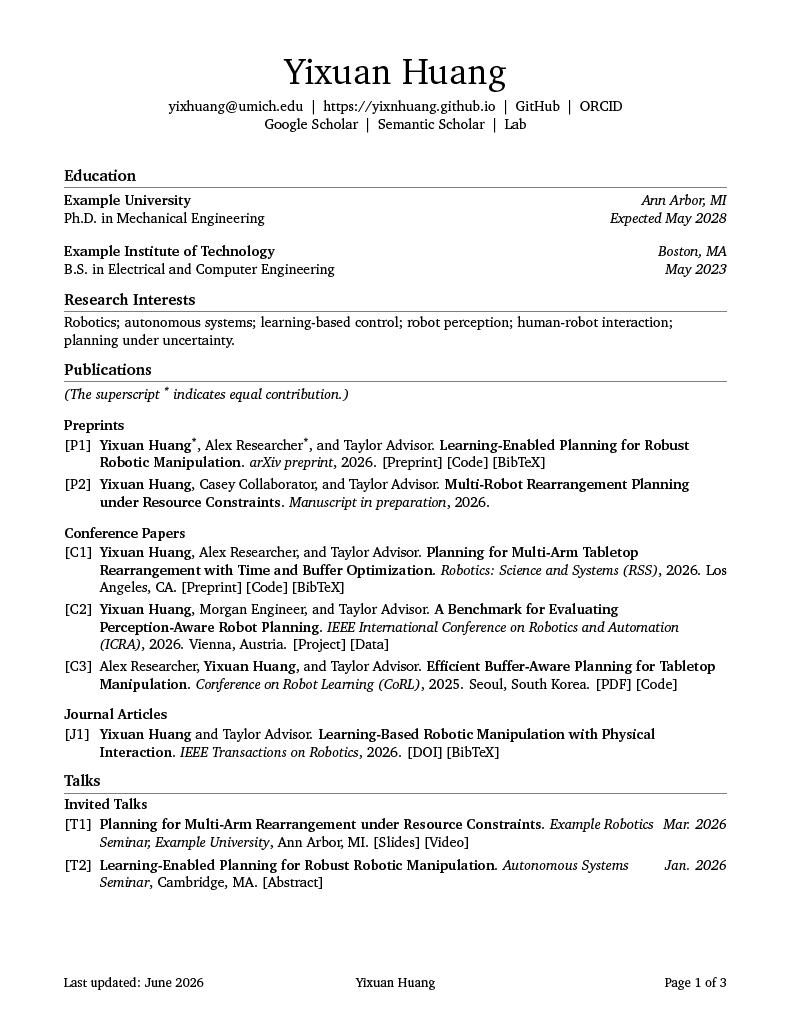
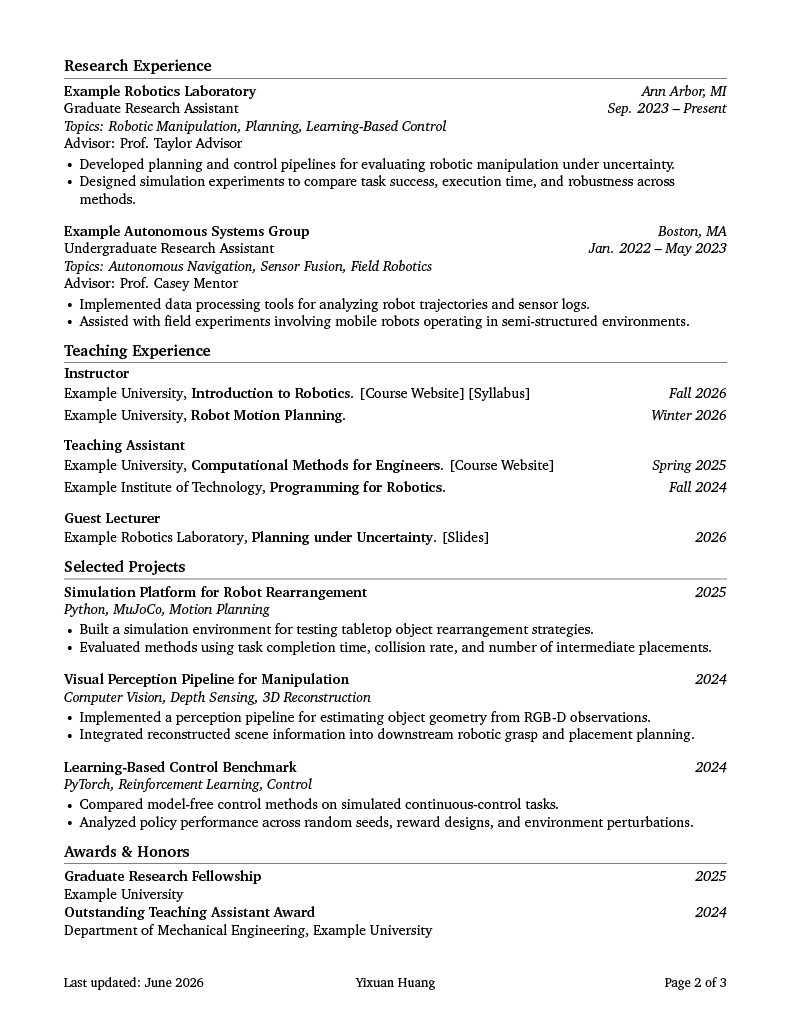
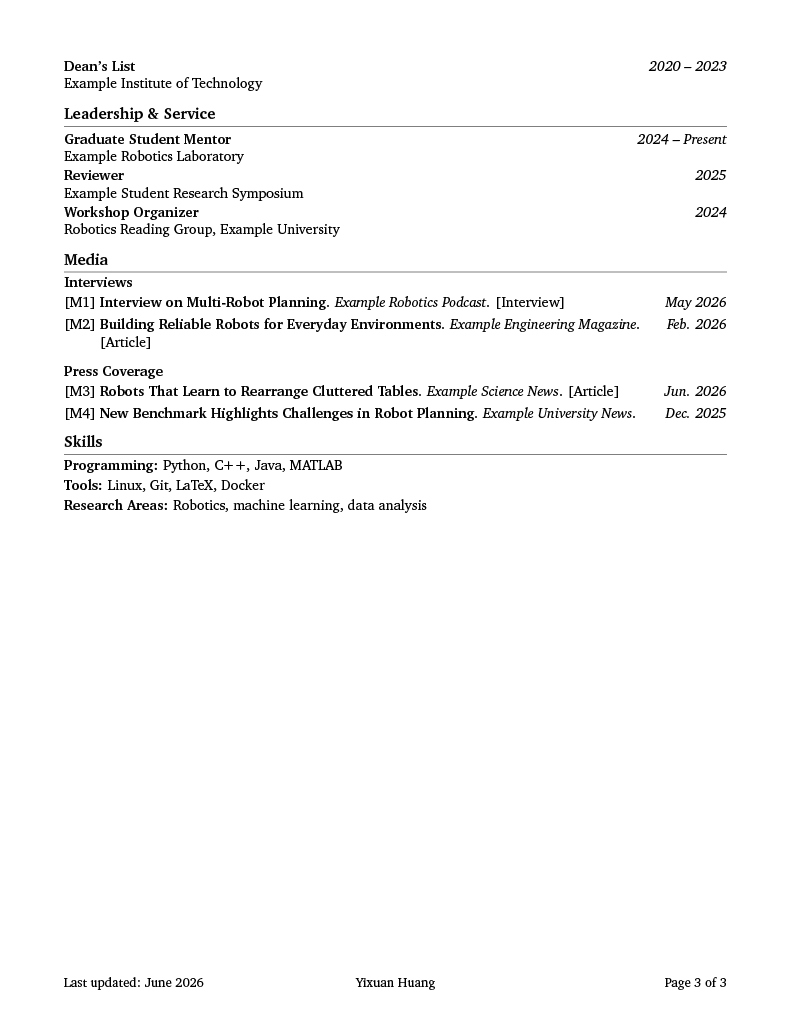
The preview below shows selected pages from the academic CV example generated with Vectra. The subject, Jordan Avery, is invented, and so is every publication, talk and award shown; they are there to fill the layout at a realistic density.
Examples
Example source files are available in:
Compiled example PDFs are available here:
The academic CV example demonstrates:
- Publications with groups, notes, indexed labels, locations, and inline links
- Talks with indexed labels and right-aligned dates
- Media entries for interviews and press coverage
- Teaching entries grouped by role
- Adaptive right-side metadata columns
- Customizable header links and constrained header width
Usage and Generated Documents
Vectra is open-source software distributed under the LaTeX Project Public License 1.3c or later.
You may use and modify the template for your own CV or resume. Documents generated with Vectra belong to their authors and do not need to display a Vectra notice, citation, watermark, or license merely because the template was used to produce them.
Modified template versions must comply with the LPPL, identify their changes, and avoid implying that they are an official Vectra release. See the plain-language license guide for details.
Features
- Clean academic CV design
- Modular section files
- Simple user-editable profile file
- Fixed professional layout
- Consistent entry formatting
- Research-oriented section structure
- Optional generated-date handling
- Footer system with support for update date, name, and page number
- PDF metadata support
- Print-friendly link styling
- Adaptive right metadata columns
- Indexed compact publication records
- Publication groups and publication notes
- Talk entries with indexed labels and right-aligned dates
- Media entries for interviews, press coverage, podcasts, and articles
- Role-grouped teaching entries with right-aligned terms
- Inline bracket-style links for publications, talks, media, and teaching
- Configurable header width
- Custom header contact links
- Maintainer-facing design parameters separated from user-facing content
Repository Structure
vectra/
├── README.md
├── LICENSE
├── NOTICE
├── /projects/vectra/licensing/
├── CONTRIBUTING.md
├── CITATION.cff
├── CHANGELOG.md
├── Makefile
├── latexmkrc
├── .gitignore
│
├── src/
│   ├── vectra.cls
│   ├── vectra-core.sty
│   ├── vectra-design.sty
│   ├── vectra-layout.sty
│   ├── vectra-sections.sty
│   ├── vectra-header.sty
│   ├── vectra-footer.sty
│   ├── vectra-fonts.sty
│   ├── vectra-colors.sty
│   └── vectra-accessibility.sty
│
├── cv/
│   └── README.md
│
├── examples/
│   ├── minimal/
│   └── academic-cv/
│
└── output/
Requirements
- pdfLaTeX
latexmk- A current LaTeX distribution such as TeX Live, MacTeX, or MiKTeX
Vectra uses pdfLaTeX as its default compiler. The included latexmkrc and Makefile provide the maintained build configuration.
Overleaf
- Download or package the repository as a
.ziparchive. - In Overleaf, select
New Project→Upload Project. - Upload the archive.
- Set the compiler to
pdfLaTeXin the project settings. - Copy an example into
cv/, or set the selected example'smain.texas the main document.
The repository does not currently publish an official Overleaf Gallery template. The GitHub repository remains the maintained source.
Quick Start
The public Vectra repository does not track personal CV source files in cv/.
To create your own local CV, copy one of the examples into cv/:
cp -r examples/academic-cv/* cv/Then edit:
cv/profile.tex
cv/settings.tex
cv/sections/
1. Edit your profile
Open:
cv/profile.texUpdate your:
- Name
- Website
- GitHub
- ORCID, if applicable
- LinkedIn, if applicable
- Location, if desired
- PDF metadata
You may also add custom header links:
\VectraAddContactLink{Google Scholar}{https://scholar.google.com/}
\VectraAddContactLink{Lab}{https://example-lab.org}
You may constrain the header width:
\VectraSetHeaderWidth{0.86\textwidth}2. Edit your CV content
Open files under:
cv/sections/Edit sections such as:
- Education
- Research interests
- Research experience
- Publications
- Talks
- Teaching experience
- Media
- Projects
- Awards and honors
- Leadership and service
- Skills
- Certifications
3. Adjust simple document settings
Open:
cv/settings.texThis file is for simple content-level settings, such as whether the footer date uses the current compile date or a fixed update date.
Vectra is not intended to be customized by changing fonts, spacing, margins, or layout internals.
4. Compile
From the repository root, run:
make cvThe generated PDF will be placed in:
output/You may also compile cv/main.tex directly using a LaTeX editor or Overleaf, provided that the project structure is preserved.
What Users Should Edit
Users should edit:
cv/profile.tex
cv/settings.tex
cv/sections/*.tex
These files contain personal CV information and content.
What Users Should Not Edit
Users should not edit:
src/
cv/main.tex
Makefile
latexmkrc
The files in src/ define the Vectra template design and layout. They are part of the Template Source and are not intended for user customization or redistribution.
Academic Record Formats
Vectra supports indexed compact records for scholarly and public-facing content.
Publications
[C1] Authors. Title. Venue, Year. Location. [Links]Talks
[T1] Title. Event, Location. [Links] DateMedia
[M1] Title. Outlet. [Links] DateTeaching
Role
Institution, Course Title. [Links]         Term
These formats are designed to remain compact while supporting long academic records.
Design Philosophy
Vectra follows a compact academic design philosophy.
The default style is intended to be:
- Professional
- Academic
- Minimal
- Readable
- Consistent
- Print-friendly
- Suitable for research-oriented applications
Vectra avoids:
- Decorative sidebars
- Excessive icons
- Overly colorful layouts
- Complex multi-column resume designs
- Manual spacing in user content
- User-facing typography customization
The goal is to let users focus on CV content while the template handles visual consistency.
Footer Design
Vectra includes a structured footer system.
The footer may include:
- Last updated date
- Name
- Page number
The intended default academic footer format is conceptually:
Last updated: <date> <Name> Page X of YThis provides useful version information while keeping the document formal and balanced.
Citation
If you use Vectra and want to recommend or share the template, please cite or link to the official repository:
Yixuan Huang. Vectra: Versatile Experience and Career Template for Research and
Academia. GitHub repository: https://github.com/yixnhuang/vectra
A CITATION.cff file is provided so GitHub can generate a citation through Cite this repository. Citation is appreciated when sharing or discussing
Vectra, but it is not required inside a generated CV or resume.
Project Status
Active. Vectra is maintained as a structured template system with versioned documentation, examples, citation metadata, and a changelog.
Contributing
Questions, compatibility reports, documentation corrections, and focused improvements are welcome. Please open an issue before preparing a substantial change so its scope and design can be discussed.
Thank you to everyone who uses Vectra, shares thoughtful feedback, and recognizes the work behind the project. Your attention and practical experience help make the template more reliable and useful.
See CONTRIBUTING.md for contribution guidelines.
License
Vectra is distributed under the LaTeX Project Public License, version 1.3c or later.
This work has the LPPL maintenance status maintained. The Current Maintainer is Yixuan Huang. Generated documents are not required to use the LPPL or display
attribution solely because they were produced with Vectra.
See NOTICE and /projects/vectra/licensing/ for project-specific clarifications.
Contact
For questions or collaboration, use the contact details below or consult the website for the latest information.
- Website: yixuanhuang.com
- Email: yixhuang@umich.edu